
While you purchase raw material from your supplier or party you need to make entry of purchased raw material. For making a Purchase Entry go to Transaction>Purchase Entry. A window will come to you as;
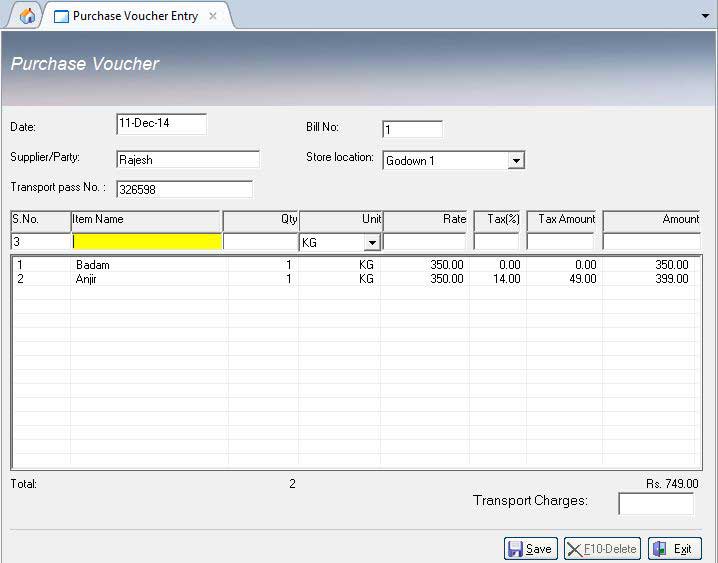
This is an important option because it later helps you to generate purchase return register. So as you fill up the information you will find out its report further. For this window you need to fill up the following details which are being given to you;
Date: Select the date of purchasing the Item.
Bill No.: Enter Voucher No.
Supplier/party: Select the supplier name. For adding new supplier name go to Inventory>Supplier.
Item Name: Select Item Name. If Item Name is not in the list, go to Inventory>Item Master for adding new Item.
Qty.: Enter the quantity of the Item (eg. 1,2,3,1.5 etc.)
Unit: Select the same unit which you opted in Item Master of that Item.
Rate: By default it will pick the rate you have fixed of that Item. In case if you bill's amount is different, enter that amount. It will adjust the rate according to the amount.
Click on save button to save it.
Press delete button from keyboard to delete a particular entry/row.
Click on delete button to delete the voucher.
Enter or double click on a row to edit it.
To view the bills press Page Up or Page Down.


Restaurant Billing Software
POS for Restaurant, Bar, Cafe, Sweet Corner, Try Free. Low cost SoftwareNO AMC, No Renewal.
Hotel Management Software
Guest Checkin, Checkout, advance reservation with simple dashboard system.
Payroll Software
Easy and simple salary software.
